How to use Compliance outlook
The Compliance outlook section helps you better understand scenarios that could affect a selected patient’s ability to achieve compliance if they miss one or more days of compliant usage per the CMS rules.
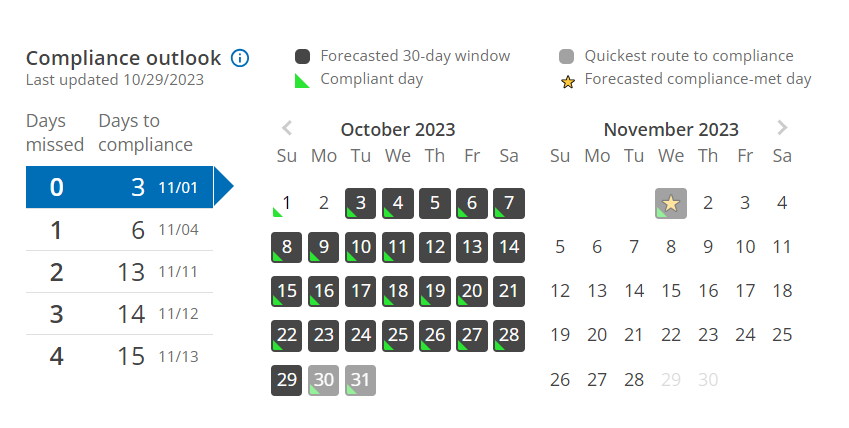
To find the Last updated date for AirView data, look just below the Compliance outlook banner in the upper left-hand corner.
The list view on the left of the Compliance outlook shows:
Days missed: This displays the number of future compliant days the patient could miss (per the CMS rules). Each missed day will affect the eventual compliance date.
Days until compliance: This is the number of compliant days the patient will then require to meet compliance per CMS rules if they miss zero to four days of compliant therapy. The forecasted date of patient compliance assumes the patient will use their machine for more than four hours each day.
The calendar view displays the projected compliance window. You can click the rows in the section on the left to view projected 30-day compliance window scenarios. As the 30-day compliance window moves, the total number of days needed to achieve compliance increases if the patient does not use their machine.
Watch the video: Navigate Compliance outlook
Note: ComplianceCoach works with up-to-date data and uses the most recent sleep session available. As with AirView, the most recent date of sleep represents the night the patient went to bed, not the morning they woke up.