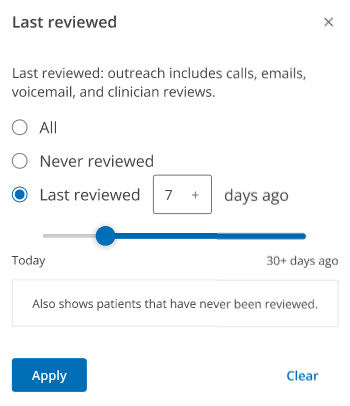
Filter patients by Last reviewed
Select one of the following options:
All: Select this option to show all patients in your organization within the 90-day CMS compliance rule.
Never reviewed: Select this option to show all patients who haven't been contacted within ComplianceCoach (for example, patients who were not marked as Called, Left voicemail, Emailed or Reviewed).
Last reviewed: Select this option, and enter the number of days to select a patient group within that range.
Note: When you filter by Last reviewed, your results include Never reviewed patients. For example, if you select Last reviewed, enter 7+ days ago and click Apply, ComplianceCoach will return patients reviewed 7+ days ago and patients who were never reviewed.
Click Apply.